Linear vs Tactile Switches for Gaming: Reset and Speed
Linear vs tactile switches for gaming, judged on the specs that move the needle: reset distance, repeated presses, and where it stops mattering.
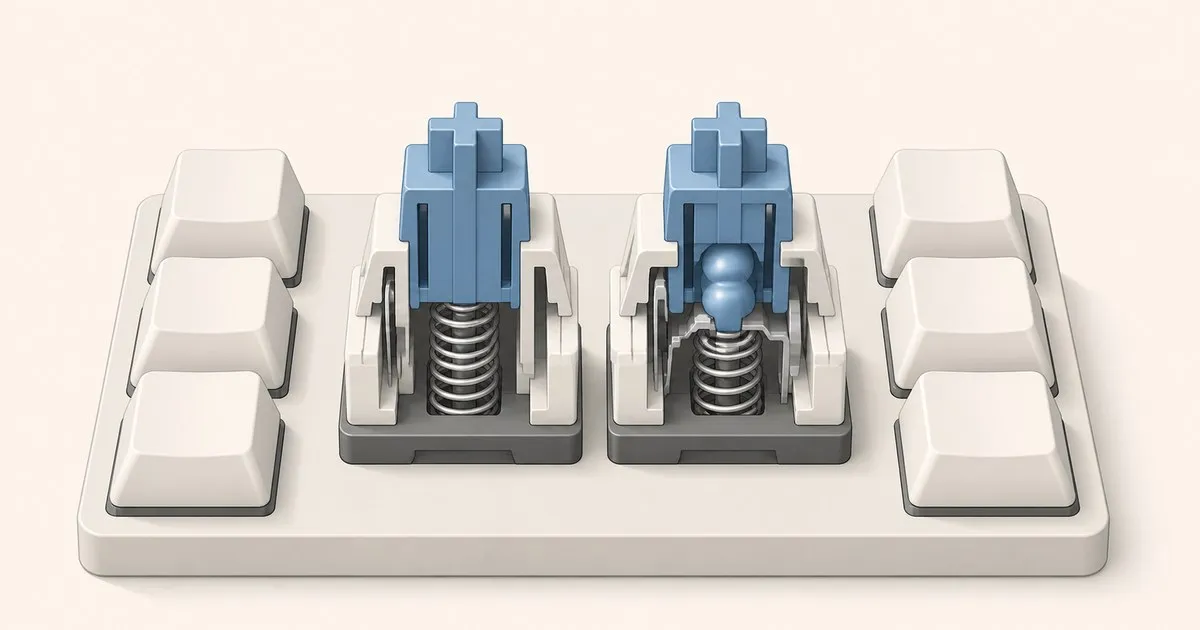
Linear and tactile switches both work for gaming. Linear describes a stroke without a deliberate tactile bump; tactile describes a change in resistance during the stroke. The useful buying question is whether you want that feedback, followed by the exact switch’s actuation and travel specifications.
This comparison uses manufacturer documentation, not gameplay benchmarks. If you need the three-family introduction, start with linear vs tactile vs clicky switches. Here the focus is repeat presses, held keys and a board shared between gaming and typing.
The specs that decide what you can infer
| Specification | What it describes | What it does not establish |
|---|---|---|
| Operating force | Force at the specified operating point | The entire force curve |
| Pre-travel | Movement before electrical actuation | End-to-end input latency |
| Total travel | Movement from rest to the bottom | The reset point |
| Reset point | Where the switch releases electrically | A universal value for every linear or tactile |
| Polling rate | How often the device can report state | Switch feel or a complete latency measurement |
Keep the units and model generation attached to these numbers. A seller’s unqualified spring weight might describe actuation, a tactile peak or bottom-out. Two matching numbers cannot establish matching feel if they refer to different points in the stroke.
Red vs Brown: the bump does not imply a different actuation depth
CHERRY’s current Red and Brown pages both list 2 mm pre-travel and 4 mm total travel, with 45 cN operating force in their specifications. Red is linear; Brown is tactile. The stated actuation depth therefore gives no basis for saying that this Red registers earlier simply because it lacks a bump.
Brown’s resistance changes during travel, while Red lacks that designed tactile event. A tactile peak is a different point from electrical actuation, which is why mixing peak-force and operating-force figures produces misleading comparisons.
The red vs brown comparison goes into the pair in more detail. For a gaming shortlist, keep the narrower conclusion: check the published numbers before treating switch family as a timing specification.
Actuation depth is separate from the linear label
Distinguish a standard linear from a short-pre-travel model. CHERRY specifies MX Speed Silver at 1.2 mm pre-travel and 3.4 mm total travel. Its shorter actuation distance is an actual specification difference from the 2 mm Red and Brown examples.
That does not translate directly into a measured gaming advantage. It says how far the mechanism travels to actuate under its specified conditions. Finger movement, keyboard processing and the rest of the input path remain separate variables.
If you want an earlier actuation point, inspect that field directly. If you tend to trigger keys while resting a finger, a shallower threshold may conflict with your preference. Neither choice requires deciding that every linear is faster than every tactile.
Short total travel is another independent property. A switch can bottom out earlier without moving its actuation point by the same amount. Read both figures instead of using a short-travel label as a substitute for a specification.
Repeat presses and the return stroke
To register separate presses, a conventional contact switch must release electrically between them. Actuation and reset can occur at different positions; the gap between those positions is often discussed as hysteresis.
A tactile bump changes resistance as the stem moves through its mechanism. That may affect which stroke you prefer to repeat, but the family label does not supply a measured reset distance. Do not infer a universal tactile penalty from the presence of a bump alone.
For repeated ability keys or movement taps, distinguish the movement you want to feel from the electrical threshold. A linear can be a sensible choice if you want no bump on each stroke. A tactile remains a valid choice if you want the physical cue. A force curve or reset specification for the exact switch is better evidence than a category slogan.
A claim that one switch saves a fixed number of milliseconds needs a stated measurement method. This guide does not have that evidence and does not turn the shorter pre-travel example into a latency benchmark.
Held keys and mixed typing
A held key remains active according to its electrical state. A tactile event is a cue during movement, not a continuing stream of new keypresses while you hold the key still. Consider the force required at the position where you actually hold the key, rather than the family name alone.
For a board that also handles writing or programming, the preferred feedback may matter as much as gaming-specific settings. A bump can be desirable if you want that change in resistance during ordinary typing. A linear can suit someone who prefers uninterrupted travel throughout the day.
Neither family guarantees fewer typing errors, less fatigue or better performance in a particular game genre. Those are outcomes that a construction description alone cannot establish. Choose a feedback preference, then check layout and configuration rather than buying a second board solely because its switches carry a gaming label.
A preference-based decision matrix
This matrix separates repeated inputs, ability-heavy games, mixed use and shared spaces. Its recommendations describe requirements, not measured performance rankings.
| Your requirement | A reasonable starting choice | What to verify |
|---|---|---|
| Repeated taps without a bump | Linear | Exact pre-travel, force and any published reset data |
| A tactile cue on ability keys | Tactile | Bump description and operating force |
| One board for gaming and writing | Either | Feedback preference and the keys you need for both uses |
| Avoid a deliberate click in a shared room | Non-clicky linear or tactile | A documented silent variant if damping is essential |
| Adjustable actuation and dynamic reset | A compatible position-sensing board | Firmware features and switch compatibility |
The shared-room row needs care. A standard linear is not automatically silent, and a standard tactile need not contain a click mechanism. A damped switch is a specific construction choice; CHERRY’s Silent Red documentation is one example.
Hot-swap lets you revise the choice
If you are unsure, a compatible hot-swap board lets you compare conventional switch options without desoldering. Check the actual socket and switch technology before ordering a replacement set.
The ability to replace an MX-style contact switch does not imply compatibility with optical or magnetic switches. Model variants can also differ even when the keyboard name is similar. The comparator’s Switch options field is therefore as important as its yes/no Hot-swap row.
A small switch tester can help you compare resistance, but it is not a substitute for the eventual keyboard when judging the complete assembly. Mounting, keycaps and stabilizers remain part of what you hear and feel.
When Hall effect changes the comparison
A compatible magnetic board reads switch position and can expose adjustable actuation or rapid trigger in firmware. Wooting describes rapid trigger in terms of movement-relative activation and release. That is a different mechanism from comparing two fixed contact-switch actuation points.
Use the Hall effect vs mechanical comparison if those settings are the reason you are shopping. A magnetic switch can itself feel linear, so magnetic versus contact sensing should not be confused with tactile versus linear feedback.
When you have actual models in mind, compare keyboards side by side and check layout, switch options and software together. The keyboard size comparison can help decide whether you need dedicated arrows or function keys for the same board’s non-gaming work.
A useful shortlist is one whose specifications match your requirements. The absence of a bump is a preference you can choose; a claimed performance advantage needs evidence beyond that label.
Sources
Related

Hall Effect vs Mechanical Switches Compared
Hall effect switches sense a magnet instead of closing a contact. A spec-level comparison against standard mechanical switches, and who should pay for one.

Red vs Brown Switches Explained: Linear or Tactile?
Red and brown switches look identical on paper, same travel and close actuation force, but they feel completely different to type on. Here is why.

Linear vs Tactile vs Clicky: Which Mechanical Switch to Buy?
The most important mechanical keyboard decision is switch type. An honest breakdown of linear, tactile and clicky switches and who each one suits best.