Membrane vs Mechanical Keyboards Compared
Membrane and mechanical keyboards differ in how a press registers, rated lifespan, key rollover and repairability. A spec-level comparison of both types.
Almost every keyboard sold is a membrane keyboard. They ship with desktops, they fill offices, and they cost less than a takeaway meal. Mechanical keyboards cost several times as much and are the default recommendation in every enthusiast space on the internet.
The honest version of that gap is narrower than the enthusiast framing and wider than the sceptical one. Here is what physically differs, which of the differences show up in published specifications, and when a membrane board is still the correct purchase.
How each one registers a keypress
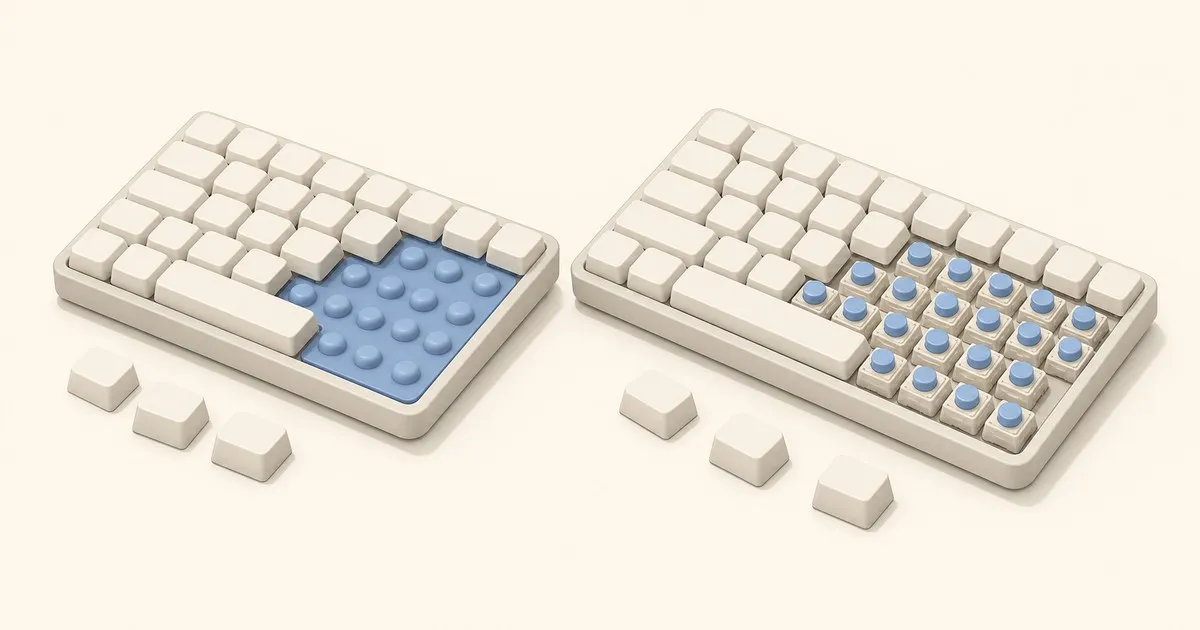
A membrane keyboard is three stacked plastic sheets. The top and bottom sheets carry printed conductive traces; the middle sheet is a spacer with a hole under every key. A moulded rubber dome sits above each key position. Pressing a key collapses the dome, which pushes the top sheet through the spacer hole until its trace touches the bottom trace and completes the circuit. Release, and the dome springs back.
A mechanical keyboard gives every key its own self-contained switch: a housing, a spring, a stem, and a metal contact mechanism. Pressing the stem compresses the spring and closes the contact partway through the travel. Nothing is shared between keys except the circuit board they are mounted to.
Two consequences fall directly out of that difference, and they explain most of the rest.
The dome has to fully collapse before anything registers. Actuation on a membrane board happens at or very near the bottom of the travel, which is why the standard advice to “type lightly, don’t bottom out” is meaningless on one. A mechanical switch actuates partway down (commonly around 2 mm of roughly 4 mm total travel), so a trained typist can register keys without slamming into the board.
The rubber dome is one continuous moulded part. It ages as a unit. Domes stiffen, tear, or lose rebound at different rates across the board, which is the mechanism behind the familiar “this keyboard has three mushy keys” complaint. A mechanical switch is a discrete component; when one fails, one fails.
TL;DR
| Membrane | Mechanical | |
|---|---|---|
| Mechanism | Rubber dome collapsing onto a printed sheet | Individual spring-and-contact switch per key |
| Where it actuates | At or near bottom-out | Partway through travel, commonly ~2 mm |
| Typical rated life | Around 10 million keystrokes | 50 to 100+ million keystrokes per switch |
| Feel options | Whatever the dome sheet gives you | Linear, tactile, clicky, silent |
| Repair a dead key | Usually replace the keyboard | Replace one switch |
| Keycap replacement | Rarely practical | Standard MX stems, huge aftermarket |
| Simultaneous keys | Often limited; ghosting is common | 6-key to full N-key rollover |
| Noise | Generally quieter | Varies enormously by switch and case |
| Spill tolerance | Sheets offer some protection | Depends entirely on the board |
| Price floor | Very low | Meaningfully higher |
| Weight | Light | Usually heavier |
The rated-lifespan gap is the clearest number
Most membrane-versus-mechanical claims are subjective. Rated endurance is not, and it is easiest to read when the same manufacturer publishes both.
CHERRY rates its KC 1000 membrane office keyboard at up to 10 million keystrokes. CHERRY rates its MX2A RED mechanical switch at over 100 million keystrokes with no loss of quality, and lists most of the MX family at either 50 or 100 million. That is a five- to ten-fold difference in published endurance from one vendor, using one vendor’s own test methodology, which makes it about as clean a comparison as this category offers.
It is worth being precise about what that number means. The membrane figure is for the keyboard; the mechanical figure is for a single switch, and the rest of the board (the controller, the cable, the stabilisers, the keycap legends) is not covered by it. In practice mechanical boards do outlast membrane boards by a wide margin, but the headline ratio overstates the case slightly.
Rollover and ghosting
This is the difference that matters most for gaming and for fast typists, and it is the least understood.
Both keyboard types read keys as a grid of rows and columns. Without a diode on each key position, certain three-key combinations create a phantom electrical path and the controller reports a fourth key that nobody pressed, or refuses to report a real one. That is ghosting and blocking. Cheap membrane keyboards typically omit the per-key diodes because they cost money and take board space, so they are limited to a handful of guaranteed-simultaneous keys, usually chosen so that common shortcuts work and arbitrary combinations do not.
There is a second, separate ceiling that gets confused with the first. The USB HID specification’s boot keyboard report carries six keycodes plus modifier bits, which is where the familiar “6-key rollover” figure comes from. Going beyond that requires the keyboard to describe itself with a different report descriptor, which is what a board means when it advertises NKRO (n-key rollover). Mechanical boards commonly ship with per-key diodes and an NKRO-capable descriptor; membrane boards commonly ship with neither.
If you have ever held three movement keys in a game and watched the fourth input vanish, you have met this limit. It is not a switch-feel problem and no amount of typing practice fixes it.
What mechanical genuinely buys you
A feel you chose. This is the real reason people switch and the hardest one to convey in a spec table. A membrane board gives you one feel, decided for you. Mechanical lets you pick between linear, tactile and clicky families, and within tactile alone the difference between a gentle nudge and a pronounced ledge is large. The red versus brown comparison is the single most useful starting point if the whole switch vocabulary is new to you.
Repairability. One dead key on a membrane board usually means a dead board, because the dome sheet and the contact sheet are not sold as spares. On a mechanical board, and especially a hot-swap board, the same failure is a 30-second component swap.
Keycaps. Mechanical switches use a standard cross-shaped stem, so essentially every aftermarket keycap set fits, in the material and profile you want. Membrane keycaps are usually thin ABS with a proprietary mount, so the PBT versus ABS question barely applies: you get what the manufacturer moulded, and the legends wear.
Serviceability in general. Keycaps that come off make the board cleanable in a way a sealed dome sheet is not.
When a membrane keyboard is still the right answer
Enthusiast writing tends to treat membrane boards as a mistake. They are not. They are the correct purchase when:
- Cost per unit is the deciding factor. Fitting out an office, a classroom or a lab is a volume problem, and the price difference multiplies.
- The board will be abused or lost. Shared workstations, workshop benches, warehouse terminals. A cheap keyboard that gets replaced is a rational plan.
- Quiet matters more than feel. A basic membrane board is quiet without any tuning. Mechanical can get there, but it takes deliberate switch selection and often case work.
- Thin and light is the requirement. Scissor-switch boards, the laptop-style variant of the membrane design, remain the best answer for travel.
The honest summary is that membrane keyboards are optimised for cost, weight and quiet, and they are genuinely good at all three. They are poor at longevity, feel, simultaneous input and repair, and no amount of marketing changes which list a given buyer cares about.
If you are upgrading, where to start
Do not start with the switch catalogue. Start with size, because it is the decision people regret most: the keyboard size comparison walks through what each layout drops, and the short answer for a first board is usually TKL. Then pick a switch family, and prefer a hot-swap board so a wrong guess costs the price of switches instead of the price of a keyboard.
For what a given budget actually buys, the budget tier breakdown covers where the money goes at each level, and the under-100 buying guide lists concrete boards in the range most first upgrades land in. Once you have two or three candidates, the side-by-side keyboard comparator puts their specifications in one table and flags only the rows where they actually differ.
One expectation to set before you spend: a mechanical keyboard will not make you type faster. What it reliably changes is that the keyboard stops being something you tolerate, lasts several times longer, and can be repaired instead of replaced. Whether that is worth the price difference is a preference question, and it is a legitimate one to answer with “no”.
Sources
Related

Best Low Profile Mechanical Keyboard 2026: 3 Picks
Low profile mechanical keyboards compared for 2026: NuPhy Air75 V3, Keychron K3 Pro and Logitech MX Mechanical Mini, on specs and firmware.

Hall Effect vs Mechanical Switches Compared
Hall effect switches sense a magnet instead of closing a contact. A spec-level comparison against standard mechanical switches, and who should pay for one.

Linear vs Tactile Switches for Gaming: Reset and Speed
Linear vs tactile switches for gaming, judged on the specs that move the needle: reset distance, repeated presses, and where it stops mattering.