Hall Effect vs Mechanical Switches Compared
Hall effect switches sense a magnet instead of closing a contact. A spec-level comparison against standard mechanical switches, and who should pay for one.
Hall effect switches went from a curiosity to a line item on mainstream keyboard spec sheets in about three years. They are also the most oversold feature in the category right now, because the marketing talks about speed while the actual difference is adjustability.
Here is what a Hall effect switch physically does differently, which of its three headline features are real, what it does not change at all, and the specific buyer it makes sense for.
The mechanical difference in one paragraph
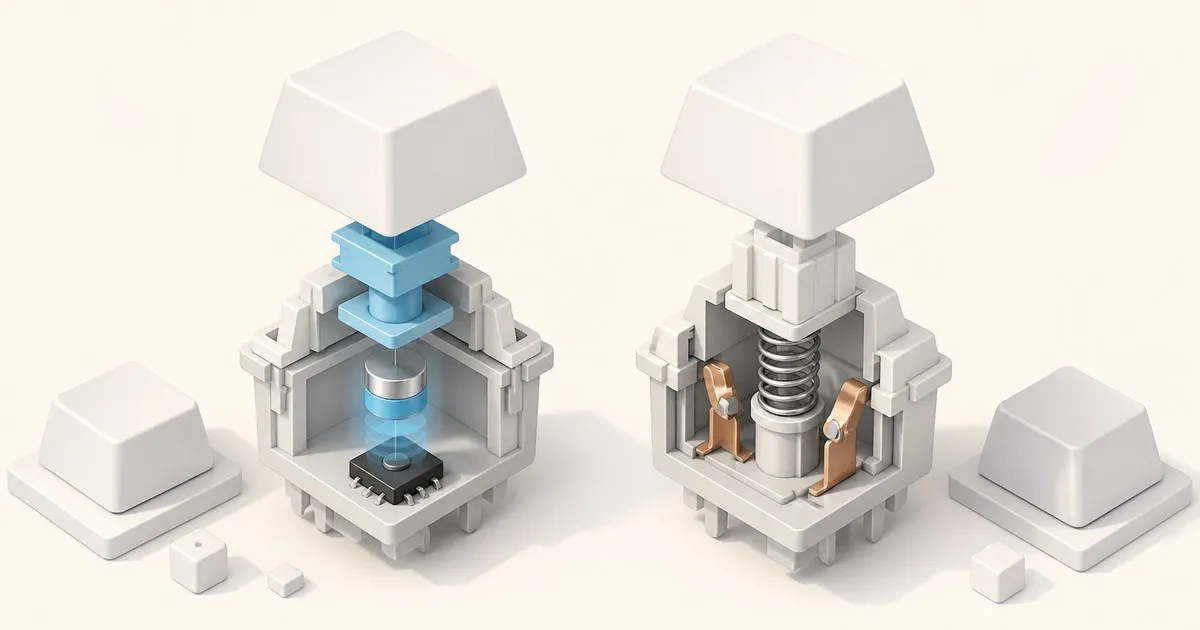
A standard mechanical switch is a contact device. Pressing the stem down moves a metal leaf until it touches another piece of metal and closes a circuit. That is a binary event: the key is either registered or it is not, and the depth at which it happens is fixed by the physical geometry of the leaf. Because metal contacts bounce microscopically on impact, the keyboard’s firmware has to run a short debounce window before it trusts the signal.
A Hall effect switch has no contacts at all. A small magnet rides in the stem, and a sensor on the circuit board underneath measures the strength of the magnetic field as the magnet approaches. Field strength maps to distance, so the board does not learn “the key is pressed”, it learns “the key is currently 1.4 mm down”. No electrical contact closes to register the press, and the actuation point becomes a number in software rather than a feature of the plastic.
Everything people like and dislike about Hall effect boards follows from that one change.
TL;DR
| Hall effect | Standard mechanical (MX-style) | |
|---|---|---|
| How a press is sensed | Magnetic field strength, continuous | Metal contact closing, binary |
| Actuation point | Adjustable in software, typically 0.1 to 4.0 mm | Fixed by the switch, commonly ~2.0 mm |
| Rapid trigger (dynamic reset) | Yes | Not possible |
| Analog / variable output | Yes | No |
| Debounce delay | Not required | Firmware debounce window |
| Contact wear over time | None; nothing touches | Contacts are the wear item |
| Switch swapping | Magnetic switches only, board-specific | Compatible MX switches |
| Feel options | Almost entirely linear | Linear, tactile, clicky, silent |
| Keycap fit | MX-style stems on mainstream magnetic switches | MX stems |
| Board selection | Narrow but growing | Enormous |
| Price floor | Clearly higher | Entry level upward |
The three features you are actually paying for
1. Adjustable actuation
This is the flagship feature and the least contested one. SteelSeries publishes a tuning range of 0.1 mm to 4.0 mm, adjustable to the nearest 0.1 mm for its OmniPoint 2.0 switches, and Wooting quotes the same 0.1 mm precision on its Lekker switches. On a contact switch that range does not exist. A Cherry MX Red actuates where the leaf says it actuates, and the only way to change it is to buy a different switch.
The practical use is per-key tuning rather than one global setting. A shallow actuation on the movement keys and a deeper one on the modifiers you brush accidentally is a genuinely useful configuration that no contact keyboard can offer.
2. Rapid trigger
Wooting introduced rapid trigger in 2019 on the Wooting two Lekker Edition and popularised it with the Wooting 60HE in 2022. The idea is that a key resets the moment it starts moving upward, by any configurable amount, instead of waiting to cross a fixed reset point. Sensitivity is configurable down to 0.1 mm of movement.
What that removes is the dead travel between actuation and reset on a normal switch. On a contact board, a repeated tap has to travel far enough up to un-close the contact before it can register again, which is why reset distance is the spec that matters most for gaming on standard switches. Rapid trigger deletes that constraint rather than optimising it, which is why counter-strafing and rhythm-game streams are the use cases everyone cites.
3. Analog and dual-action input
Because the board knows depth continuously, it can report a variable value instead of an on/off keypress: a gradual walk, a throttle, a steering axis. SteelSeries also exposes it as two actions bound to one key at different depths, so a light press walks and a deep press sprints.
This is the feature with the widest gap between how good it sounds and how often it gets used. It only works in titles that accept analog input, and outside driving and flight games that is a short list.
What Hall effect does not change
It does not change how the board sounds. Sound comes from the case, the plate, the mounting system, the foam, and the keycaps. A magnet in the stem does not alter any of that. If sound is what you are chasing, case material and mounting style are where the money should go instead.
It does not give you a tactile bump. Magnetic switches are overwhelmingly linear, because a tactile leg complicates a design whose whole point is a clean linear travel curve. A handful of tactile magnetic switches exist, but the catalogue is thin compared with the MX world. If the bump is what you like about typing, Hall effect currently asks you to give it up.
It does not change your keycaps. Mainstream magnetic switches use MX-compatible stems, so a normal keycap set fits, and every consideration in the keycap profile comparison still applies unchanged.
It does not make you type faster. Adjustable actuation is a competitive-gaming tool. Setting a shallow actuation point for prose typing mostly raises the rate of accidental keypresses, especially if you rest your fingers on the home row.
What you give up
The switch ecosystem. This is the biggest and least advertised cost. A Hall effect board’s sockets are wired to magnetic sensors, so they accept magnetic switches designed for that board and nothing else. You cannot drop in a Cherry, Gateron or Kailh switch, which means the whole comparison in the switch brand guide is off the table. Hot-swap on a Hall effect board is not the same freedom as hot-swap on an MX board; it is a much smaller catalogue and, on some vendors, effectively a single-supplier one.
Firmware openness, usually. Most Hall effect boards run vendor software because analog calibration has to happen somewhere, and open firmware historically had no model for it. Keychron’s Q1 HE is the notable exception, shipping with a QMK-derived launcher, so if OS-independent remapping matters to you it is worth checking that spec explicitly rather than assuming.
Money. Hall effect sits in the upper price bands. That is real opportunity cost: the same spend on a contact board buys a better case, a gasket mount and a decent keycap set. The budget tier breakdown is a useful sanity check before committing.
Some competitive rules. Rapid trigger itself is permitted in the games that made it famous. The related SOCD null-bind behaviour, which Razer markets as “snap tap” and Wooting as SOCD, is a separate question: Valve banned it in Counter-Strike 2 on 20 August 2024, alongside in-game null binds and jump-throw binds, on the stated principle that it would no longer allow automation “via scripting or hardware” that replaces a coordination skill. Other titles have taken their own positions and the rules here have moved before, so check the current ruleset for the game you are buying this for rather than the keyboard’s marketing page. Note that rapid trigger and SOCD are separate settings on every board that ships both, so a title banning one does not make the keyboard unusable there.
FAQ: compatibility and durability
Can standard MX switches go in a Hall effect board?
Only if that exact board explicitly supports both sensing systems. Keychron’s Q1 HE documentation restricts switch compatibility to its supported magnetic family. A matching physical footprint or a hot-swap label does not establish electrical compatibility.
Does magnetic sensing mean nothing wears out?
No. Removing an electrical contact from registration leaves the stem, spring and housing as moving parts. Wooting still documents a physical switch assembly. A vendor keystroke rating is a specification under stated conditions, not a forecast for the whole keyboard.
Can magnetic switches be lubricated?
Check the exact switch manufacturer’s maintenance instructions before opening one. A factory-lubed description is not an instruction to add more lubricant, and conventional switch instructions do not establish how to handle every magnetic design.
Do ordinary keycaps fit?
Check the stem and key widths separately. The Q1 HE documentation describes that board’s caps and layout. Magnetic sensing alone tells you neither the cap attachment shape nor the bottom-row sizes needed by another model.
Who should actually buy one
Buy Hall effect if you play competitive first-person shooters or rhythm games at a level where counter-strafing precision or tap frequency is a limiting factor, and you are willing to accept linear-only feel and a closed switch catalogue to get it. For that buyer the feature is not marketing; it removes a genuine mechanical constraint.
Skip it if you are buying primarily for typing, for programming, or for an office. There is no typing benefit, and for a shared room a quiet contact switch solves a problem that Hall effect does not address at all.
Think twice if you are buying wireless. Continuously sampling an analog sensor on every key costs more power than scanning a contact matrix, so Hall effect and long battery life pull against each other, on top of the usual wireless protocol trade-offs.
Where the boards actually come from
The Hall effect market is still small enough to describe in a paragraph. Wooting sells direct rather than through retail, which is worth knowing before you go looking for a 60HE on a marketplace listing. SteelSeries is the mainstream retail option and the one most likely to be in stock locally. Keychron’s HE series is the pick if you want magnetic switches without giving up open firmware. Corsair’s MGX switches are genuinely magnetic, but check the range before you assume the specs match: Corsair publishes 0.4 mm to 3.6 mm in 0.1 mm steps, against the 0.1 mm to 4.0 mm that SteelSeries and Wooting quote. Prices move constantly in this segment, so treat any figure you read as a starting point rather than a quote.
One brand needs separating out, because the marketing language makes them look interchangeable. Razer’s Huntsman V3 Pro offers adjustable actuation across 0.1 mm to 4.0 mm and rapid trigger, exactly like the magnetic boards above, but it is not a Hall effect keyboard. Its Analog Optical Gen-2 switches measure how much light the stem blocks on its way down rather than the strength of a magnetic field. Functionally you get the same two headline features from a different sensing method; the practical differences are that the switch catalogue is Razer’s rather than the magnetic ecosystem’s, and that Razer claims resistance to magnetic and metallic interference, which is a real failure mode for a magnetic board sat next to a magnetic wrist rest or a speaker. If adjustable actuation and rapid trigger are what you are buying, it belongs on the shortlist. If “Hall effect” specifically is what you are buying, it does not.
Two practical notes if you do buy. First, sensor quality varies more than the spec sheets suggest, and inconsistent per-key calibration is the common complaint on the cheapest magnetic boards; a vendor that publishes a calibration routine is a good sign. Second, treat the 8,000 Hz polling numbers on the box as a tiebreaker at most, since the sensing change is what actually shortens the input path.
If you have narrowed it to two or three specific boards, including the Hall effect ones, the side-by-side keyboard comparator puts their normalised specs in one table and highlights only the rows where they genuinely differ, which is usually a much shorter list than the marketing implies.
Sources
- Wooting — Rapid Trigger, and why it matters for games
- Wooting 60HE+ — official product page (Lekker L60, adjustable actuation)
- SteelSeries Apex Pro TKL — OmniPoint 2.0 HyperMagnetic switch specifications
- Keychron Q1 HE — official product page
- CORSAIR K70 MAX — MGX magnetic switches, 0.4 to 3.6 mm in 0.1 mm steps
- Razer Analog Optical Switches Gen-2 — light-based sensing, 0.1 to 4.0 mm
- HLTV — Valve bans snap tap, SOCD and null binds in Counter-Strike 2 (20 August 2024)
Related

Linear vs Tactile Switches for Gaming: Reset and Speed
Linear vs tactile switches for gaming, judged on the specs that move the needle: reset distance, repeated presses, and where it stops mattering.

Cherry vs Gateron vs Kailh: Switch Brands Explained
Cherry, Gateron, Kailh, and the newer boutique makers all sell 'red,' 'brown,' and 'blue' switches — but the brand behind the color matters too.

Membrane vs Mechanical Keyboards Compared
Membrane and mechanical keyboards differ in how a press registers, rated lifespan, key rollover and repairability. A spec-level comparison of both types.